The “Reply All” Problem… Solved: Tech Tool Tuesday for Salespeople

Do you have a “Reply All” horror story? Have you ever realized, seconds after hitting “Send”, that your message was going to someone who really, really, really  shouldn’t get it?

Most of us have — Reply All is simultaneously a wonderful convenience and an easy way to damage your career by sending sensitive information to the wrong person.

Reply All Email Horror
Photo Credit: Ed Yourdon via Compfight cc

When one of my sons was in middle school, we had an extended email argument with the Vice Principal about a 7th grade teacher assignment. Eventually the Principal joined the email chain. Vice Principal got fed up with me and sent an extremely candid assessment of my personality to his boss.

Of course, he used Reply All to do it, and I received his colorful assessment in my inbox. Five minutes later, I received an abject apology… and the next day he caved in on the argument.

Although I benefited from that particular fiasco, I’ve been on the other side of that issue on several occasions, and often wished that there was a way to take an email back after sending it.

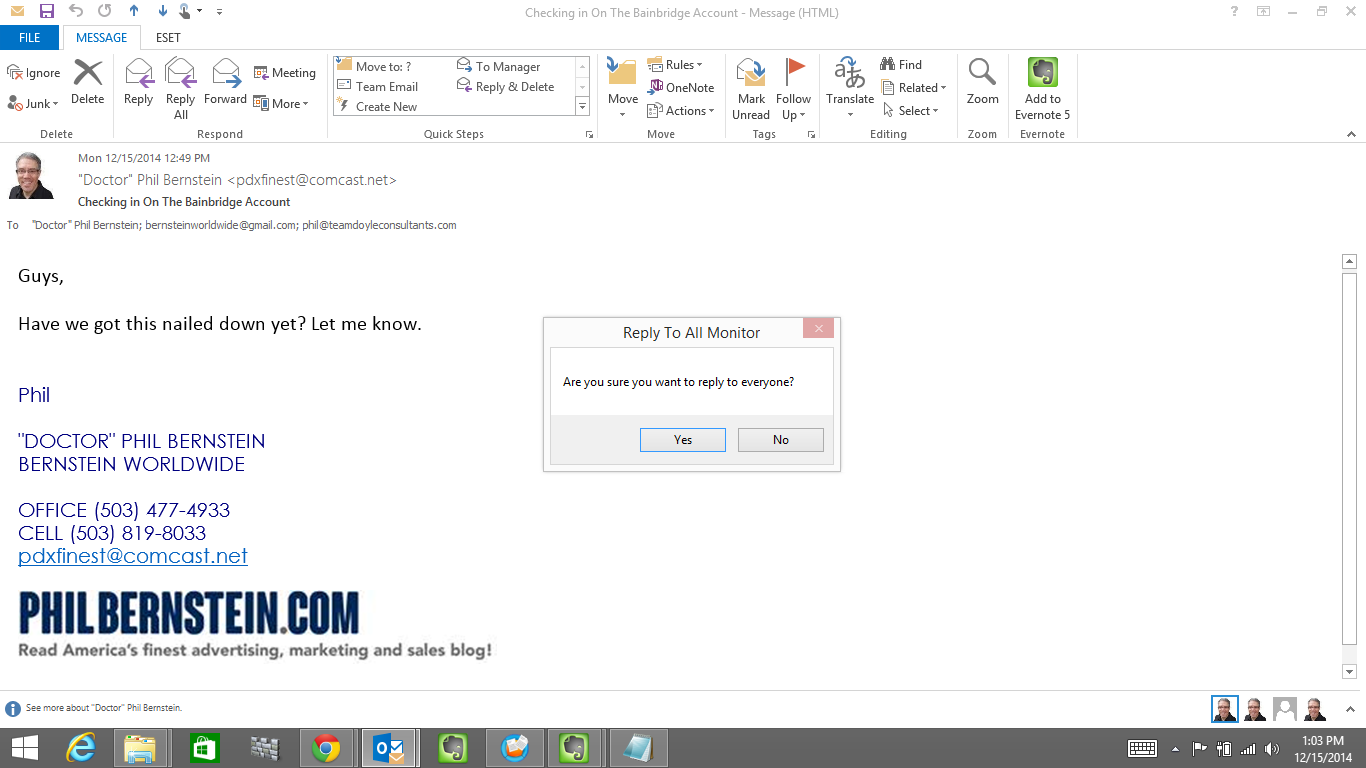
About three years ago I discovered the next best thing: Reply All Monitor by Sperry Software. It’s a $14.95 add-in for Outlook that pretty much does one thing: it warns you when you’re about to reply to everyone. That “one thing” can be a biggie.

For example: you get a group email from your manager, asking if everything’s okay with the Bainbridge account. You want to tell your boss, in confidence,  that one of your team members is a butt-head. You’re trying to multitask, and you hit Reply All by mistake.

That’s when Reply to All Monitor kicks into action:

"Hang on just a minute there, Hoss!"
“Hang on just a minute there, Hoss!”

Reply to All Monitor does a few more things as well: it will notify you when you are about to Reply All when you’ve been BCC’d (so that you don’t inadvertently give up your anonymity), and tip you off when you just hit “Reply” on a group email (in case you genuinely wanted to reply to everyone).

The big picture is this: it slows you down and makes you take one more step before you do something stupid. That one extra step has saved me from heartache and despair an average of three times a year since I bought it.

[reminder]What’s the worst message you ever sent, or received? Got a Reply All horror story?[/reminder]

Does Your Name Tell Your Story?

There are lots of ice cream store chains in the United States. But there’s only one Big Gay Ice Cream.

Doug Quint and his Big Gay Ice Cream Truck
Photo Credit: *Bitch Cakes* via Compfight cc

The company began its existence in Manhattan as the Big Gay Ice Cream Truck in 2009, and quickly took off. There are now two shops in Manhattan, along with a “permanent pop-up” at the Ace Hotel in Los Angeles. The web site indicates that more stores are planned for Los Angeles and Philadelphia.

As a marketing tool, the name has three important things going for it:

  • It is so far from the expected that it forces  people (i.e. potential customers) to pay attention.
  • It establishes a genuine point of differentiation. That differentiation doesn’t have to be the product itself to be significant, which is likely similar to ice cream you can buy elsewhere.
  • It implicitly accepts the risk that some people will be offended, and will refuse to buy ice cream from this truck because of the name. Owner Doug Quint is willing to sacrifice that business in return for a (presumably larger and more loyal) customer base that will seek him out. (For more on this concept, go here).

[reminder]What’s the most unusual name you’ve seen for a (reasonably mainstream) business? Please keep it PG-13 for a family readership.[/reminder]


Tech Tool Tuesday for Salespeople: Smartphone Expense Apps

Have you got an expense account? That means keeping receipts, and turning them in once a month to someone who’d like you to be a little more organized.

accountant kitty is not amused
Photo Credit: apium via Compfight cc

When I was a radio Account Executive, my company’s business department required us to tape our receipts to an 8-1/2 x 11 sheet of paper and turn them in with a special form at the end of the month. It was a cumbersome process, and I left money on the table plenty of times by losing receipts. I am convinced that my company knew this, and saved millions of dollars a year on receipts that were never turned in.

For a salesperson, there are few worse feelings than finding a significant October receipt in January.

It’s a whole lot easier these days. As Brett Nuckles, the Tech Editor of Business News Daily put it not long ago,

That’s where your smartphone comes in. The right apps make it easy to manage your expenses on the go by taking advantage of your phone’s features, including the camera and GPS sensor.


The article lists seven expense-tracking apps for Android and iPhone. I’ve been using Expensify for about a year with very good results. As soon as I pay the check in a restaurant, I open the Expensify app on my phone and take a picture of the receipt. Expensify lets you file the receipts in virtual folders (when I wrote this post in Upstate New York,  all my receipts were going into a folder named “Utica 2”).

Expensify organizes all of the photocopies into an expense report, and does all the math for you. It’s a simple process to download the whole report into a pdf and email it to Accounting.

The app is free, and there are both free and paid versions of the service. Bells and whistles in the paid version include integration into things like Quickbooks.

[reminder]Have you got a tech tool that saves you time, money or hassle? Tell us about it![/reminder]


Five Incredibly Useful Tools Every Connected Salesperson Needs

Which computer are reading this on right now? Depends on where you are.

At any given time, I may be working any of four machines — at my desk on a Windows desktop computer, in Starbucks on  my Windows laptop, on a plane tapping on my iPad Mini, or in line somewhere thumbing my iPhone. Many of the sellers I work with live in a similar multi-gadget world.

Each one has our contacts, our calendars, our office paperwork, and our proposals. Our lives are on these things. How do we keep them all connected?

Tech cat compfight cc

Photo Credit: Annamagal via Compfight cc

 Here are five tools I use to keep it all straight:

Evernote: Twenty years ago I was the guy whose desk looked like a bomb had gone off. Papers scattered everywhere… piles on top of piles. I insisted I knew where everything was. I was lying. Now most of the paper’s gone — I scan it or snap a picture with my phone, upload it to Evernote, and throw it away. Evernote is the file cabinet I keep everything in, with a search function so powerful I can find anything by typing in a few keywords. There’s an app for Windows, Mac, iOS, and Android, so you can keep it all connected. There’s a free version, with a Premium going for $45 a year.

Fujitsu ScanSnap Scanner: Somehow all that paper has to get into Evernote. I good scanning device makes the job so much easier. I’ve been using the Scansnap for a couple of years now. It’s very compact, so it doesn’t take up much room on my desk; scans smoothly and quickly, and you can set it to deposit documents directly into Evernote, into another folder on your computer, or attached to an email. The only thing it can’t do is travel. For a while I brought a Neat Receipt portable scanner with me on the road, but I was never thrilled with it. These days on the road I can just take a photo with my phone (Evernote connects to the camera).

CompanionLink: I’m constantly making calendar entries and adding contacts, on whatever device I have handy at the time. It’s Outlook on the Desktop/Laptop, plus the calendar and contact apps on my phone and tablet. Companionlink for Outlook keeps it all straight. An entry into Outlook is sent, via CompanionLink, to Google, which then syncs with my phone and tablet. The new CompanionLink 6 does it in real time, so I no longer have to sync manually. As of this writing, you can buy a license outright for $49.95 or pay $14.95 a month for a subscription. They offer a 14-day free trial.

Calendly: Here’s the problem this is designed to solve: You are trying to schedule three separate meetings with three separate clients, all of whom have asked when you’re available during the same week. You can send each of them a list of available times, knowing full well that your schedule is going to change five minutes after you send it, and that two of your customers are going to choose the same time.

I just started using Calendly in the past few days in an effort to solve this issue. Calendly syncs with your Google calendar. You set the parameters (length of the meeting, days/times you’re willing to be available, etc). Calendly gives you a web link to send out. Your customers only see the times you’ve made available; each time someone chooses a time, the meeting shows up on your calendar and that time disappears from what everyone else sees. If you’ve got Google syncing with your devices (see CompanionLink, above), the process should be seamless. There’s a free version, and a significantly more robust paid version for 10 bucks a month (8 if you pay for a year in advance). I’ve only been using it a few days on a 14-day free trial, and my opinion may change, but so far I like it a whole bunch.

Wunderlist — I’ve struggled with To-Do lists for years. Outlook was too inflexible. Evernote’s Reminders has some good features, but I found it too hard to keep track of everything on a day-to-day basis. Enter Wunderlist, an app that does the “to-do” thing and nothing else. You can categorize tasks (work, home, errands, “at computer”, etc), and set due dates when appropriate. It gives you the ability to look at a single day or the week at a glance. Tasks disappear with a satisfying check of a box. There’s a web version, along with apps for Windows 8, Mac,  iOS, and Android, and the devices sync through the cloud. They’ve got a free version, along with a “Pro” option for five dollars a month. I’ve done just fine with the free one so far.


[reminder]What’s your favorite indispensable tech tool? Tell us all about it![/reminder]

The Five “Why’s” of Sales

It came in the middle of a Michel Fortin teleseminar on copywriting a few years ago. Fortin was interviewing the legendary direct-response writer John Carlton, and he let Carlton do most of the talking. But in passing, and without elaboration, he mentioned his philosophy on the sales process.

The most important word to your customer, said Fortin, is “Why?”. From attention to interest to desire to action, there are five “why’s” that need to be answered.

Here’s what the client wants to know:

Photo Credit: Adam Foster | Codefor via Compfight cc
  1. Why me?

  2. Why your product or service?

  3. Why from you instead of a competitor?

  4. Why at that price?

  5. Why now?

A few examples (elaborations are mine):

If you do home remodeling, your prospect needs to be dissatisfied with something about his or her home; decide that new windows or a remodeled kitchen will improve the situation; become convinced that you are the best one to do the job; believe that your work is worth the money you charge; and that now’s the best time to get started.

If you’re a Ford dealer, your customer must be convinced that he needs a new car or truck; that a Ford is a better choice than a GMC, Dodge or Toyota; that your store is a better place to buy than another Ford dealership; that your price is a fair one; and that now is the time to buy.

If you offer anti-aging medical services, your customer needs to decide she needs to improve her appearance; that the procedure you offer will make her look the way she wants to look; that your practice is the best place to get the procedure; that your price represents the best value; and that now is the time to get it done.

It’s not enough to tell your customer each of these things — you need to show that customer why.

Although advertising will begin the process and move it along, in most cases it won’t completely answer all of these “why’s” by itself. The rest of the process will happen when your customer calls, looks at your website, or walks into your store or office. But before your prospect pulls out wallet, credit card or checkbook, all of the “why’s” need to be answered — and answered to the customer’s satisfaction, not yours.

Make sure you know where you are in the sales process with each customer. Which “why” do you need to answer next?

[reminder]When you lose sales, which “why” is the one you’re most likely to have missed?[/reminder]