It was a short turnaround situation, the client told her, and when the client looked for Debbie’s phone number in a recent email, it wasn’t there. She was in a hurry, and rather than look it up, the client just moved on to someone else.
To protect your interests, Sunshine recommends making sure your email signature contains “these five pieces of information:
Your Name
Your Title or Personal Brand Statement
Your Company
Your Phone Number
Your Email Address
I will add one thing to his list: make sure the information is text rather than an image.
Many people now use software to scrape contact data from an email directly into their contact file — that software won’t find that data in an image. Rather than typing it in by hand, some buyers won’t bother — which means your phone number and email address won’t be in their smartphones.
Given a choice between looking your number up manually and just pressing your competitor’s name with her thumb, what’s your client going to do? Unless she really has to talk to you, she’ll do whatever’s easiest.
Is Your Voice Mail Greeting Chasing Business Away?
Have you ever called someone’s cell phone and gotten this greeting?
You’ve reached five… oh… three… eight… one… nine… eight… oh… three… three. The person you are calling is not available. Please leave a message after the tone.”
Did you wonder if you had the right number?
If your clients don’t know if they’ve reached you or just some random cell phone, they may not leave a message — it’s easier, and feels safer, to just call the next name on the vendor list.
Take a few minutes to set their mind at ease: record a personal greeting with your own voice. Just give your name and ask callers to leave a message.
And if your voice mailbox is full — or if your wondering if it might be getting full — clean it out.
20% of your account list is going to disappear every year no matter how good you are. So you’ve got to be looking for new business every single day.”
That information was given to me by an experienced radio salesperson when I was a rookie Account Executive a long time ago.
I’ve never seen the 20% figure confirmed in an actual study, but my fifteen years on the street convinced me that it was probably low.
photo by rodimovpavel
Business get bought and sold. Sometimes they shut down.
Marketing directors come and go. They get promoted. They get fired. They get seduced by advertising agencies who tell them they can “buy it cheaper.”
Good relationships go bad, sometimes for reasons completely out of your control. An AE I know in Texas lost an HVAC client because her boss — the station GM — refused to pay his bill when they fixed his air conditioner.
Sooner or later, it’s gonna happen to you. So you’ve got to keep hunting for new customers to replace the ones who disappear.
Here are 3.4 ways to do that.
The .4 An Exercise for Small-Market Salespeople
If you work in a small market, it’s easy to convince yourself that there’s nobody left to talk to. It’s not true — a search engine can teach you that the math is in your favor.
Google “How many businesses are in [Name of Your Town] and look for the listing from Manta.com. Manta is a business search engine that keeps track of this stuff, and will give you a quick raw number. Here’s an example I showed an AE in Medford, Oregon.
Imagine that. 13,859 companies in little Medford, Oregon.
Were all 13,859 companies good prospects for TV or radio advertising? Nope. But some of them were. There were five salespeople on the station’s staff, which gave each one more than 2,000 to investigate.
If you work in a small market, go to Google and find the Manta number for your community.
The Other Three Ways to Find New Local Advertising Clients
Avoid your own media property. The clients on your radio or TV station are already taken. The money’s on the other guys… watch or listen to the competition instead. When you go online for news, don’t go to your site — go to a competitor’s site. Make note of the advertisers you see and hear.
Subscribe to your local daily newspaper and read it. On paper. Every day. Your newspaper publishes its account list every day and will deliver it to you for a small fee. And “the paper” remains a reliable source of information about your local business community.
There’s an AM/FM radio in your car. Use it. Don’t talk on the phone when you drive, or listen to CD’s or satellite. You can find local money being spent on local radio — turn it on and let the leads come out of the speakers. For local direct clients, news/talk and country tend to do particularly well. It doesn’t matter if you like the music, or agree with the host. You’re interested in the commercials. Reminder: if you work in radio, the money’s on the competition.
Bonus tip: New opportunities are everywhere if you’re looking for them, and we forget things quickly. Carry a small paper notebook and pen with you at all times. The easiest way to remember is to write it down. You can use your smartphone, but I’ve found it quicker and easier to use an old-school analog notebook for the task.
Moleskine makes a good notebook, but I’m partial to the $9.00 Ecosystem Journal, which fits in my back pocket and has perforated pages.
You never know what happened right before the meeting started. What seems like rudeness might have another explanation.
photo by BillionPhotos.com/dpc
A few weeks ago I was presenting to a law firm. Five people from the firm had been at the first meeting, and four were to be at the follow-up meeting. Three of them arrived on time, but we had to wait for the fourth – the managing partner of the firm.
He finally arrived 20 minutes late, with only the most perfunctory apology. He sat down and we got underway.
As I was going through my part of the presentation, the managing partner kept checking his smartphone, reading and sending texts. He wasn’t bothering to hide it, either. Midway through the meeting his phone rang. He answered it, and without even a glance at me he got up and left the room. His assistant signaled me to keep going, so I continued.
A few minutes later the managing partner came back in, sat down, and resumed paying attention to me and his phone simultaneously. I did my best to conceal my growing irritation at the guy’s clear lack of respect.
Eventually we got to the end of the presentation, and asked for a commitment. The managing partner said he needed to go through the financials with his accountant before he could make a decision.
I asked if he could give us an answer later in the week, and that’s when he dropped the bomb:
“I’m not sure,” he said. “My wife is out of town, and she was in a car wreck this morning. She’s in the hospital; we’re hoping she’ll be released tomorrow. As soon as this meeting’s over, I’ve got a six-hour drive to go see her.” He showed us some pictures of his wife’s car she had emailed to him – the entire front end smashed in, and the air bags deployed.
At that moment, all my irritation went away, replaced by a strong sense of guilt. He hadn’t been disrespecting us – the fact that he showed up for the meeting at all was a powerful sign of how strongly he believed in keeping his commitment to me and the station. Under the circumstances, his lateness and divided attention were more than understandable.
A few weeks later, his wife is home and expected to make a full recovery. And I’ve re-learned a sales lesson.
The Sales Lesson Is…
When we sit down with a client, we often don’t know what else is going on in their world. They may have just been chewed out by their boss; a family member may be ill or injured. The solution we’re offering may be the most important thing on our mind… but there might be a much bigger problem on their mind.
Until you know the full story, give them the benefit of the doubt.
A sales presentation is like a circus. You need to control the show.
Photo by patrimonio designs/dpc
We were doing a needs analysis at an auto dealership in the southeast. The meeting was at the store, in the dealership General Manager’s office; the General Manager wanted us to know that he was in charge.
As the station AE, sales manager, and I tried to ask our questions, the client checked his email. His desk phone rang, and he answered it. His cell phone rang, and he answered it. Salespeople walked in and out of the office with papers to sign.
It was a circus… his circus… and he was the ringmaster.
Somehow we managed to gather enough information to take the next step, and we invited him to the station for a presentation in a couple of weeks. He accepted the invitation, we put it on the calendar, and left.
During the meeting, the client had told us that he really wanted a jingle for his store. We put a creative strategy together, found a good jingle company, and had a spec produced using the strategy we had devised. We built the proposal and rehearsed it. On Presentation Day, we were ready.
About 40 minutes before the meeting was scheduled to begin, the dealer’s assistant called. “Bob doesn’t have time to come to the station today. He wants to know if you can do the presentation in his office.”
The account executive, sales manager, and I looked at each other, and agreed on the answer.
“No.”
We knew that if we went to his office, it would be chaos once again. Ringing phones, paperwork, and constant interruptions. There was no way to do a cohesive presentation on his turf. The AE called the store back, and politely told the assistant that the only way we could do the presentation was if Bob came to the station. “And by the way,” she told the assistant, “we think Bob is really going to like the jingle.”
For the rest of the week, we were at a stalemate. Bob wouldn’t come to us, and we wouldn’t go to him. When I left town at the end of the week, we agreed that I would do the presentation as a webinar — but only if Bob came to the station.
Two weeks went by. Every few days, the account executive called the dealership and politely reminded the assistant that she would love to play the new jingle for Bob. One day I got an email from the AE: “Bob has agreed to come to us! Can you do a webinar next Monday?”
The short version of what happened next: Bob came to the station for the webinar on Monday, liked our creative strategy, and loved the jingle. A few days later, he agreed to a $60,000 annual commitment.
The Sales Lessons of This Story
[bctt tweet=”A sales presentation is like a circus. You need to control the show.”]
1. Your best chance at a successful presentation comes when you control the environment. Author and marketing consultant Perry Marshall compares a presenter to a lion tamer:
The circus animals will test you to see if you’re jumpy. They’ll throw you curve balls. In some situations they might even cast insults or lie to you, observing how you’ll react. If they detect a chink in your armor, they’ll pounce on you like a pack of hungry jackals. Circus Brimstone. But nothing unnerves them like a stoic, unflappable opponent who knows his position inside and out.
A circus trainer must always enter the ring first, and in full sight of the lions. In doing so, he establishes that the ring is his territory, not theirs, a notion that he reinforces by shouting, by stomping about, by snapping his whip.
The lions are impressed. Mighty predators though they are, they crawl in with their tails low…
It’s always better to do the sales presentation on your territory, not theirs. Wherever possible, make them come to your office.
2. Sometimes the most effective answer you can give a client is a firm “No.”
“No” won’t work if the client views your offering as a commodity. It will work if you have something that the client values, and can’t get anywhere else. If you have what the client wants, “No” changes the terms of the interaction, and puts you in charge.
[reminder]How have you regained control of a sales interaction?[/reminder]
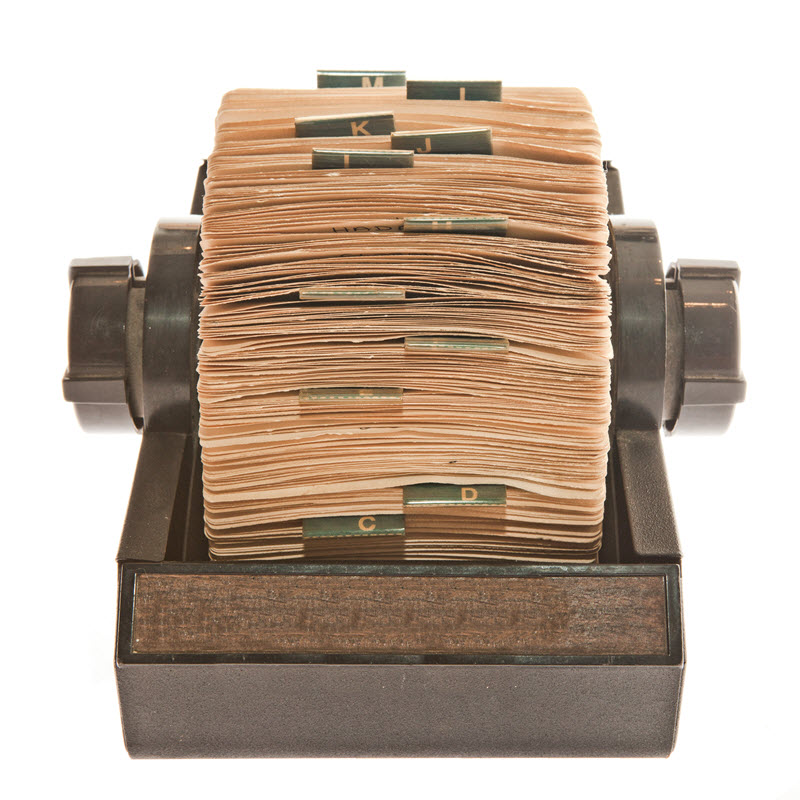
In the dark ages, we had a Rolodex. It was stuffed with business cards, which we collected everywhere we could.
When we had time, we entered the contact information manually into our computers.
Photo by Stockninja/dpc
Automation has come to this process, and smart salespeople use it. For several years, I had two tools the got the job done:
CardMunch, a LinkedIn product that was, in its prime, an excellent business card scanner for the iPhone.
I used Gwabbit to pull contact information from emails.
Unfortunately, LinkedIn stopped supporting CardMunch, and it was eventually shut down. Meanwhile, Gwabbit never got around to supporting Outlook 2013, which ultimately made it useless. I have been looking for alternatives ever since, and have found a couple that get the job done.
A Very Good, But Spendy, PC Tool for Salespeople
I’ve been using AddressGrabber Standard for a couple of weeks on my laptop, and like a great deal. It is very simple to use – when you receive an email from a new contact, you highlight the information that needs to go into your contact manager (for me, Outlook 2013), click an icon to transfer the information, proof it, and save. It’s quick, simple to use, and pretty darn accurate. Occasionally information will go into the wrong fields, but the corrections are easy to make.
This is a huge timesaver when you start working with multiple contacts in a new company. When I start a revenue initiative with a new TV station, I ask all of the account executives and sales managers to send me an email. Then I go through the emails and drop the contact information in Outlook. The whole process for a 10-person sales staff might take me three or four minutes.
Two minor drawbacks: it will not recognize contact information from images, and if your contact doesn’t include their email address in their signature line, you have to enter it by hand. One major drawback: at $69.95 for a single machine license, AddressGrabber is expensive. But it works.
A Pretty Good Free Smartphone Tool For Salespeople
Evernote has had business card scanning built into its smartphone app for quite some time. Earlier this year it released a separate app called Scannable, which has many uses. For me, the most common use has been business card scanning.
Scannable is very simple to use – put the card on a contrasting background, and it will automatically detect the card and snap a picture. If you are an Evernote user you can upload the card to Evernote, and if not you can email or message the information. If you authorize a connection to your LinkedIn account, you can even make a LinkedIn connection right from the app.
Scannable’s major drawback is accuracy. Where CardMunch used actual human beings to double-check everything, Scannable is completely automated, and in day-to-day use I would rate it about 60% accurate. Once the information is entered, you need to proof it carefully, and it is not uncommon to need to clean up a few things. For a single card, entering by hand may be just as fast.
But if you have multiple cards to process it once, Scannable is a much faster option even when you take into account the necessary proofing. While there is significant room for improvement, Scannable is the best tool I have found since CardMunch went away.
One other note: as of this writing, Scannable is not available for Android. Evernote does have a business card scanner built into their main Android app, and there are certainly other options available.
In 2015, you shouldn’t have to enter contact information by hand. Automate the process, and use the time you save to sell.
[reminder]What are you using to capture contact info?[/reminder]




 , which fits in my back pocket and has perforated pages.